
Best Digital Business Card App in 2026: What to Compare Before You Choose
Compare the best digital business card apps by features, pricing, sharing methods, and trade-offs. Honest breakdown of what matters and what doesn't.
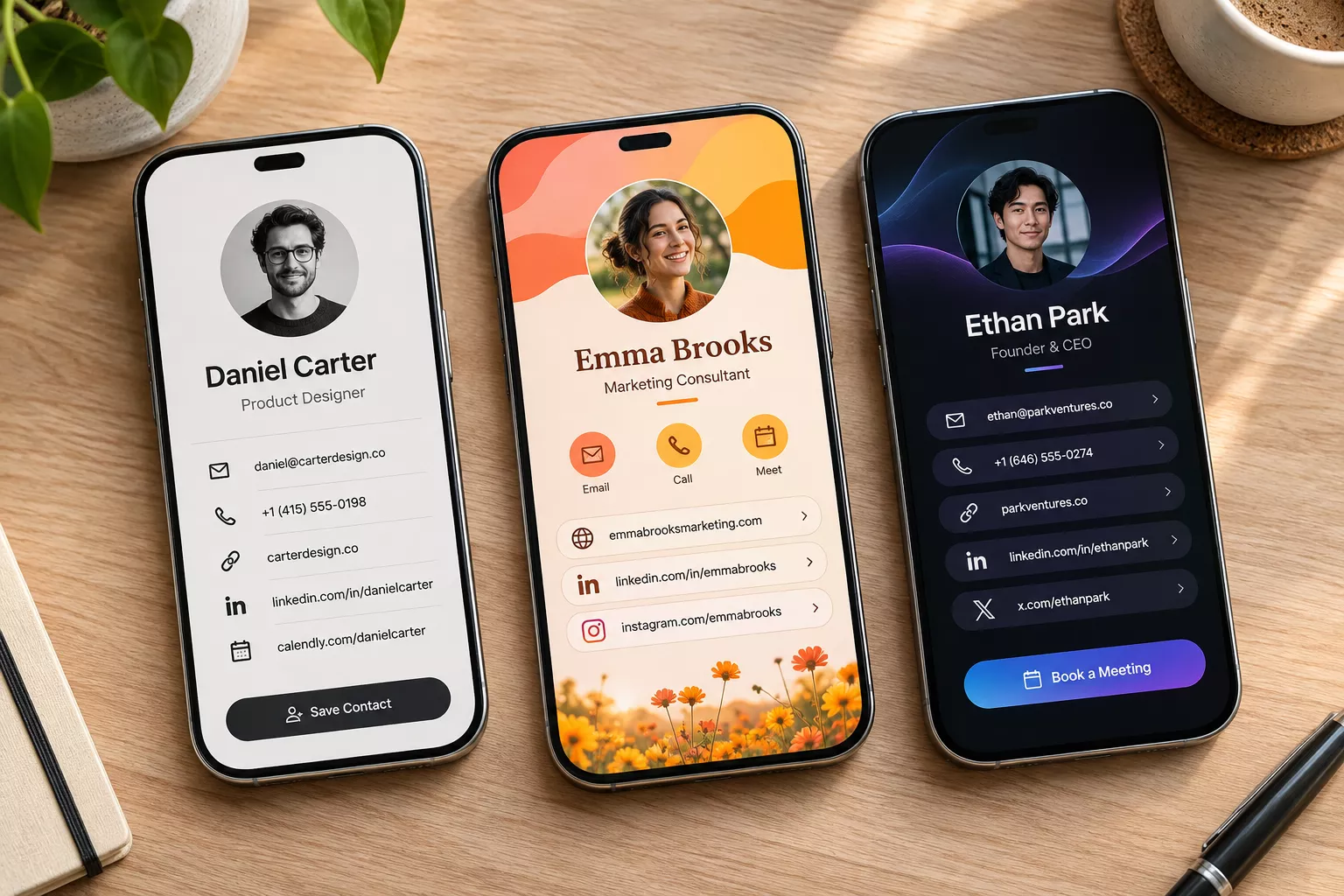
The best digital business card app depends on what you need — a free personal profile, a team deployment with brand controls, NFC card pairing, CRM integration, or analytics. No single app wins on every feature, and most comparison articles rank platforms without explaining the trade-offs.
This guide breaks down the criteria that actually matter when choosing a digital business card app, compares how the major platforms handle each one, and flags the limitations you should check before committing.
What a Digital Business Card App Does
A digital business card app lets you create a web-based profile page that holds your name, title, contact details, social links, photo, and bio. You share it via a link, QR code, or NFC tap. The recipient opens it in their phone browser — no app install required on their end.
If you are new to digital business cards, read How to Create a Digital Business Card for a step-by-step walkthrough. This article focuses on comparing platforms, not building your first card.
The 8 Features That Matter Most
After evaluating what professionals actually use day-to-day, these are the criteria worth comparing across platforms. Everything else is secondary.
1. Free Plan Depth
Most apps offer a free tier. The difference is what they include. Some free plans limit you to one card with branding from the platform. Others give you a full profile with no watermarks.
Questions to ask:
- Can you remove the platform's branding on the free plan?
- How many links can you add?
- Is analytics included or locked behind a paywall?
- Can you use a QR code to share on the free tier?
A free plan that forces recipients to see "Made with [Platform Name]" on your card undercuts the professional impression you are trying to make.
2. Recipient Experience
This is the most overlooked criterion. Your card is useless if the recipient cannot open it easily.
The best apps open your profile as a standard web page in the recipient's browser — no app download, no account creation, no friction. The recipient taps a link or scans a QR code and sees your information immediately.
Some platforms require the recipient to download an app or create an account to save your contact. That is a dealbreaker for most real-world networking scenarios. If someone at a conference has to install an app to get your phone number, they will not do it.
3. Sharing Methods
A digital business card is only useful if you can share it in the situations where you actually network. The main sharing methods are:
- Direct link — copy and paste your URL via text, email, or DM
- QR code — scan with a phone camera; works in person and digitally
- NFC tap — hold a physical card near a phone; fastest for in-person
- Apple Wallet / Google Wallet — save your card to a phone wallet for quick access
- Email signature — embed your link or QR code in every email you send
Not every platform supports all five. Some charge extra for NFC card pairing or wallet integration. If in-person sharing is important to you, make sure the platform supports both NFC and QR — they cover different device capabilities. See QR code vs. NFC differences for the full comparison.
4. Profile Customization
At minimum, you need to control: name, title, company, photo, bio, and which links appear. Beyond that, useful customization includes:
- Theme selection — colors, light/dark mode, layout style
- Link ordering — choose which links appear first
- Custom labels — rename links (e.g., "Book a call" instead of "Calendly")
- Toggle visibility — hide specific links without deleting them
Some platforms offer dozens of themes. Others give you a rigid template with limited color options. How much this matters depends on whether your card needs to match an existing brand or personal style.
5. Analytics
Analytics tell you whether your card is working. The baseline you should expect:
- Profile views — how many people opened your card
- Link clicks — which links people actually tap (LinkedIn, email, phone, etc.)
- Time-based trends — views over days, weeks, or months
More advanced analytics include geographic data (what cities/countries your viewers are in) and device breakdowns. Some platforms reserve analytics entirely for paid plans.
If you hand out cards at events, analytics are how you measure which events generated real engagement and which did not.
6. Contact Capture
Contact capture lets visitors send you their information — typically name, email, and phone — directly from your profile page. This turns your card from a one-way broadcast into a two-way exchange.
Not all platforms include this. Some offer it only on paid plans. If lead collection matters to your workflow, check whether the free tier includes it or locks it behind a subscription.
7. Team and Enterprise Features
If you are setting up cards for a team, department, or company, individual plans will not scale. Look for:
- Admin dashboard — manage all team members' cards from one place
- Brand templates — enforce consistent logos, colors, and layouts across all cards
- Bulk provisioning — create or update dozens of cards at once
- CRM integration — push captured contacts to Salesforce, HubSpot, or other CRMs
- Role-based permissions — control who can edit what
Team features are almost always paid. Pricing typically shifts to per-user-per-month or per-user-per-year billing. Compare the per-seat cost carefully — it adds up fast at 20+ users.
8. NFC Card Integration
Some digital business card apps sell their own NFC cards. Others are software-only and expect you to bring your own NFC tag. The integration quality varies:
- Tightly integrated — the app sells NFC cards that pair directly to your digital profile through a dashboard. You manage everything in one place.
- Loosely integrated — the app supports NFC but requires you to buy a generic NFC tag and manually program it with your profile URL.
- No NFC support — software-only; sharing is limited to links and QR codes.
If you want a physical card, a tightly integrated platform saves time and avoids the hassle of programming NFC tags yourself. Kobexa, Popl, Linq, and Blinq all sell their own NFC cards. For a deeper look at how NFC cards work, see What Is an NFC Business Card?
Platform Comparison Table
This table compares publicly available features across well-known digital business card platforms. Pricing and features change — verify current details on each platform's website before purchasing.
| Feature | Kobexa | Popl | HiHello | Blinq | Linq |
|---|---|---|---|---|---|
| Free digital profile | Yes | Yes | Yes | Yes | Yes |
| Platform branding on free plan | No | Yes | Yes | Yes | Yes |
| QR code sharing | Yes (free) | Yes | Yes | Yes | Yes |
| NFC cards available | Yes (NFC + QR on every card) | Yes | No (software only) | Yes | Yes |
| Analytics on free plan | Yes | Limited | No | Limited | Limited |
| Contact capture | Yes (free) | Paid plans | Paid plans | Paid plans | Paid plans |
| Themes / customization | 30+ themes, colors, dark mode | Templates | Templates | Templates | Templates |
| Wallet pass (Apple/Google) | No | Yes (paid) | Yes (paid) | Yes (free) | Yes (paid) |
| Team admin dashboard | No (individual focus) | Yes (paid) | Yes (paid) | Yes (paid) | Yes (paid) |
| CRM integration | No | Yes (paid) | Yes (paid) | Yes (paid) | Yes (paid) |
Sources: Blinq comparison, SPOTIO review, Lynkle comparison. Pricing and feature availability verified as of mid-2025; check each platform's current pricing page for the latest.
Reading the table: No platform checks every box for free. Kobexa gives you the most on the free tier (analytics, contact capture, no platform branding, 30+ themes). Popl and Linq are strong on NFC hardware and team features but gate most functionality behind paid plans. HiHello is solid for individuals who only need a basic profile. Blinq stands out for including wallet passes on the free plan.
How to Choose Based on Your Situation
Individual Professional — No Team, Minimal Budget
You need a free plan that does not watermark your card, includes basic analytics, and lets you share via link and QR code. NFC cards are a nice add-on but not essential if most of your networking is digital.
What to prioritize: free plan depth, recipient experience, profile customization.
Freelancer or Consultant — Client-Facing, Needs to Stand Out
You want customization (colors, themes, bio, portfolio links) and contact capture so potential clients can reach out directly from your card. Analytics help you track which networking channels bring leads.
What to prioritize: customization, contact capture, analytics.
Sales Team — 5+ People, Need CRM Integration
You need team admin controls, branded templates, and the ability to push captured contacts into your CRM. Per-seat pricing is your main cost driver.
What to prioritize: team features, CRM integration, per-seat cost.
Event Networker — Conferences, Meetups, In-Person Heavy
You need a physical NFC card with QR fallback for maximum compatibility. Speed matters — an NFC tap takes under one second, which is faster than pulling up a QR code on your phone screen.
What to prioritize: NFC card quality, QR code reliability, wallet pass support.
Limitations to Check Before Committing
URL portability. Your digital business card lives at a URL owned by the platform (e.g., platform.com/yourname). If you leave, that URL stops working. Check whether the platform offers custom domain support or URL redirects upon cancellation. Most do not.
Data export. If you capture contacts through your card, can you export them as a CSV or sync them to an external CRM? Some platforms hold your contact data hostage until you upgrade.
Free plan longevity. Free plans can change. A platform may add branding, limit features, or remove the free tier entirely. Before investing time in building your profile, check the platform's track record on free plan stability.
NFC card lock-in. Some platforms sell NFC cards that only work with their software. If you switch platforms, the physical card becomes useless. Look for platforms where the NFC card can be reprogrammed or where the card points to a URL you control.
App requirement for the sender. Some platforms require you (the card owner) to install a mobile app to manage your card. Others let you do everything through a web browser. If you prefer not to install another app, look for a fully web-based dashboard.
International shipping. If you order NFC cards, check shipping availability and cost for your country. Free shipping is common for domestic orders (e.g., Kobexa includes free U.S. shipping) but international rates vary by platform.
How to Get Started with Kobexa
Kobexa is designed for individuals who want a full-featured digital business card without paying for a subscription. Here is what you get for free:
- Create your profile at kobexa.com/signup — add your name, title, bio, links, photo, and contact details.
- Choose a theme — pick from 30+ themes, set your accent color, and toggle dark mode.
- Share immediately — copy your link, download your QR code, or add it to your social bios.
- Track performance — view profile visits, link clicks, geographic data, and activity timelines from your dashboard.
- Capture contacts — visitors can send you their information directly from your profile.
If you want a physical card, Kobexa NFC cards include both NFC and a printed QR code on every card — free U.S. shipping, available in Black, Blue, Green, and Pink.
Frequently Asked Questions
Do I need an app to create a digital business card?
Not always. Some platforms like Kobexa are entirely web-based — you create and manage your card through a browser dashboard without installing anything. Others require a mobile app for setup or management. The recipient never needs an app regardless of which platform you choose — they open your card in their phone browser.
Can I use multiple digital business card apps at the same time?
Technically yes, but it creates confusion. If you have profiles on two platforms, you are maintaining two URLs and two sets of information. It is easier to pick one platform, put all your links on it, and use that single URL everywhere. If you need separate cards for different roles, most platforms let you create multiple profiles within one account.
Is a paid plan worth it?
For individuals, usually not. Most free plans cover the essentials — a shareable profile, QR code, and basic analytics. Paid plans add value for teams (admin controls, CRM sync, branded templates) or for power users who need wallet passes, custom domains, or advanced analytics. If your free plan does what you need, there is no reason to upgrade.
How do I switch from one digital business card app to another?
Create your new profile, update the links you have shared (email signatures, social bios, printed materials), and redirect anyone who had your old URL. The hard part is printed materials — if your old URL is on business cards or flyers, those links will break. This is why some people prefer platforms that let you use a custom domain, which you can point to any service.
What is the difference between a digital business card app and a link-in-bio tool?
Link-in-bio tools (Linktree, Beacons, etc.) are designed to aggregate links for social media profiles. Digital business card apps are built specifically for professional networking — they include contact-specific features like vCard downloads, contact capture, NFC card pairing, and professional themes. There is overlap in functionality, but the intent and design are different. A link-in-bio page is optimized for followers; a digital business card is optimized for new professional contacts.
Are digital business card apps secure?
Reputable platforms use HTTPS encryption and standard data protection practices. The main security consideration is what data you put on your card — it is a public page, so only include information you are comfortable sharing with anyone who scans your code or taps your card. For contact capture data (information visitors send you), check that the platform stores it securely and complies with privacy regulations like GDPR if you operate in the EU.
Which app has the best NFC cards?
This depends on what you mean by "best." Popl and Linq offer multiple card materials and form factors (metal, wood, PVC). Kobexa focuses on PVC cards with NFC + QR built into every card in four colors. Blinq also sells NFC cards. HiHello is software-only and does not sell physical cards. If NFC quality and a combined NFC + QR card matters, compare the specific card materials and pairing process before ordering.
The best digital business card app is the one that fits your workflow, not the one with the longest feature list. Start with the free plan that covers your needs, test it in real networking situations, and upgrade only if you hit a genuine limitation.
Ready to upgrade your networking?
Get your NFC business card from Kobexa
Tap to share your profile instantly — no app required. Pair it with a QR fallback and keep your details updatable forever.
Shop Now